


 Github Stars:
 Last Commit:
  Created:


Overview
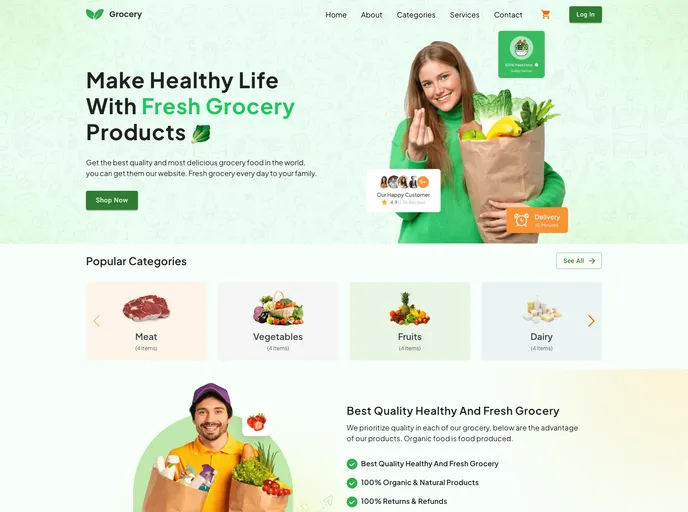
The Grocery Application is a user-friendly and easy-to-use landing page built with React, Material UI, and Tailwind CSS. It offers user authentication, a mobile-friendly and responsive design, a simple and minimalistic interface, product categories, a shopping cart, and the ability to place orders for selected grocery items.
Features
- User authentication: Log in to the application with ease.
- Mobile-friendly and responsive design: Optimized for all devices, including mobile, tablet, laptop, and desktop.
- Simple and minimalistic interface: Offers a seamless and intuitive user experience.
- Product Categories: Find and purchase various grocery items organized in different categories.
- Shopping Cart: Edit, increase or reduce quantities, and delete items in your shopping cart.
- Place Orders: Easily place orders for your selected grocery items.
Installation
To get started with the Grocery Application, follow these steps:
- Clone the repository:
https://github.com/ahmod001/grocery.git - Install dependencies:
npm install - Start the application:
npm start - Access the application in your browser:
http://localhost:3000
Summary
The Grocery Application is a user-friendly and visually appealing landing page built with React, Material UI, and Tailwind CSS. It provides essential features such as user authentication, a responsive design, a minimalistic interface, product categories, shopping cart functionality, and the ability to place orders. The installation process is straightforward with clear steps provided. The Grocery Application is licensed under the MIT License and acknowledges the contributions of the UI designer, DesignAxen.


