


 Github Stars:
 Last Commit:
  Created:
Overview:
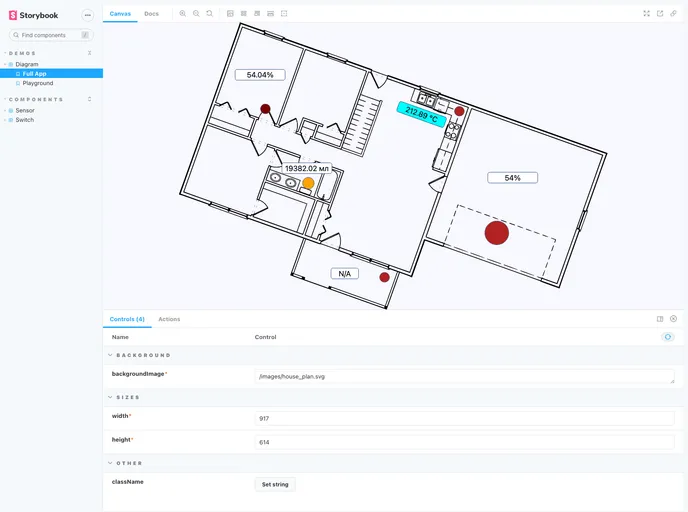
mini-hmi is a React component library that allows users to build Human-machine interfaces. It provides a set of components that can be used to create interactive displays and sensors. The library includes features such as background image support, switch displays, and sensor displays with customizable formats.
Features:
- Diagram component: Allows users to wrap mini-hmi components with a Diagram root component. It displays a background image provided by the user and aligns nested components.
- Switch component: Displays boolean values and supports three states: on, off, and not available. Users can customize the enabled color, disabled color, and not available color.
- Sensor component: Displays numeric values with optional formatting. Users can specify the format and format options for the displayed value.
Installation:
To install the mini-hmi theme, follow these steps:
- Install mini-hmi using npm:
npm install mini-hmi
- Import the required components in your React project:
import { Diagram, Switch, Sensor } from 'mini-hmi';
- Wrap mini-hmi components with the Diagram component:
<Diagram backgroundImage="url-to-image" width={600} height={400}>
  <Switch state={true} x={100} y={100} width={100} />
  <Sensor value={25} x={200} y={200} width={100} />
</Diagram>
- Customize the components by passing additional props as needed.
Summary:
mini-hmi is a React component library designed for building Human-machine interfaces. It includes features such as a Diagram component for wrapping components, a Switch component for displaying boolean values, and a Sensor component for displaying numeric values with customizable formats. The library provides a convenient way to create interactive displays and sensors in React projects.


