


 Github Stars:
 Last Commit:
  Created: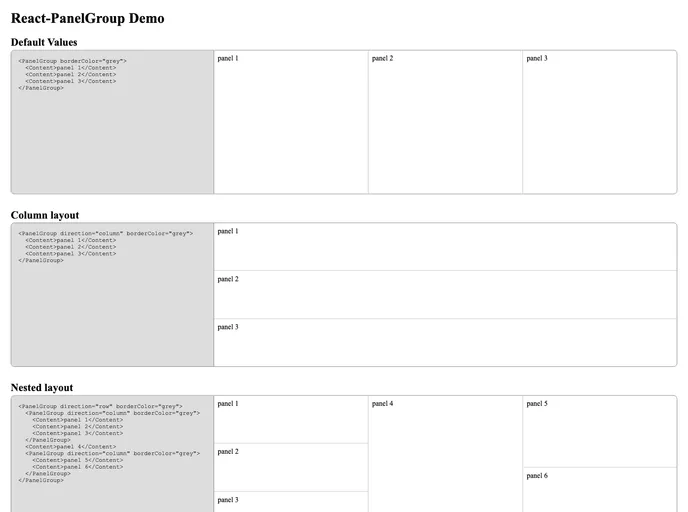
Overview
React-PanelGroup is an innovative React component designed to enhance your web application’s layout through its resizable panel group functionalities. Whether you’re building a dashboard or a complex web layout, this tool provides a flexible way to create dynamic, responsive designs. It brilliantly combines absolute and relative sizing to offer seamless resizing and layout management, making it a valuable asset for developers looking to optimize user interfaces.
With features that support both column and row orientations, along with the ability to nest panel groups, React-PanelGroup enables you to design intricate layouts with ease. Its intuitive props for customizing appearance and behavior will streamline development while ensuring a polished final product.
Features
Absolute & Relative Sizing: Choose between absolute pixel sizes and relative weights, allowing for versatile and complex layouts that can adapt as needed.
Neighbor-Aware Resizing: Panels intelligently resize in relation to their neighbors, enhancing the user experience by maintaining a cohesive visual flow.
Column & Row Orientations: Supports both vertical and horizontal panel arrangements, making it easy to create grid-like layouts through nesting.
Snap Points: Offers snapping functionality to predefined sizes, enhancing precision when resizing panels for a more controlled layout design.
Dynamic Defaults: If no props are specified, the panel group defaults to a horizontal orientation with equally stretchy widths for simplicity.
Customizable Component Props: Plenty of options such as spacing, border color, and panel color customization to tailor the appearance to your needs.
Defined Panel Sizes: Initialize panels with specific size parameters, ensuring they meet layout needs right from the start.
Callbacks for State Updates: Utilize callbacks during resizing to maintain external control and efficiently manage state changes.


