


 Github Stars:
 Last Commit:
  Created:

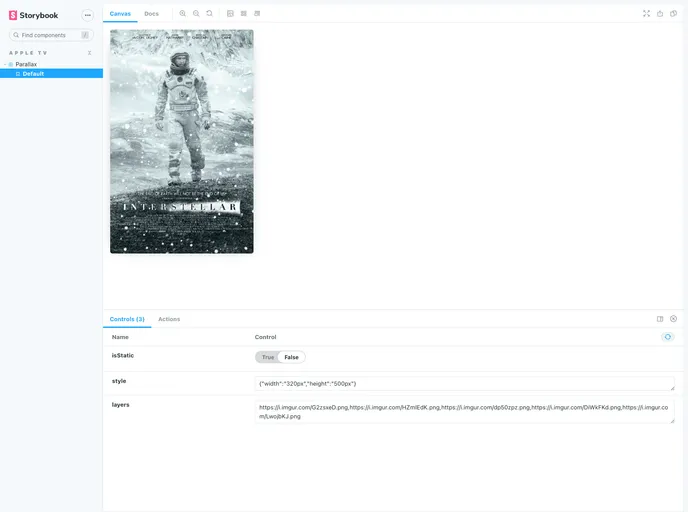
Overview
The Apple TV Parallax is a npm package that allows you to create a parallax effect on images, similar to the Apple TV’s home screen. This package provides an easy-to-use API to implement the parallax effect in your projects.
Features
- Layered Images: Stack multiple images on top of each other, with the topmost image appearing in the front.
- Static Mode: Disable the parallax effect and display a flattened image instead.
- Custom Styles: Apply custom CSS properties to the images.
- Custom Classes: Add custom class names to the parallax element.
Installation
To install the Apple TV Parallax npm package, you can use the following command:
npm i @dreamsparkx/parallax
Usage
To use the Apple TV Parallax, follow these steps:
- Import the package in your project:
import Parallax from '@dreamsparkx/parallax';
- Create a new instance of the Parallax class:
const parallax = new Parallax(options);
- Configure the parallax options:
layers(required): The list of images to be stacked on top of each other. The last element will be at the top.
const options = {
  layers: [
    'image1.jpg',
    'image2.jpg',
    'image3.jpg'
  ]
};
isStatic(optional): Set totrueto disable the parallax effect and display a flattened image instead.
const options = {
  layers: [
    'image1.jpg',
    'image2.jpg',
    'image3.jpg'
  ],
  isStatic: true
};
style(optional): Pass on CSS properties to customize the appearance of the parallax element.
const options = {
  layers: [
    'image1.jpg',
    'image2.jpg',
    'image3.jpg'
  ],
  style: {
    width: '100%',
    height: '100%',
    backgroundColor: 'black'
  }
};
className(optional): Pass on a custom class name to the parallax element.
const options = {
  layers: [
    'image1.jpg',
    'image2.jpg',
    'image3.jpg'
  ],
  className: 'custom-parallax'
};
- Start the parallax effect:
parallax.start();
Summary
The Apple TV Parallax npm package provides an easy way to add a parallax effect to your images. With its simple API and various customization options, you can create visually appealing and interactive designs similar to the Apple TV’s home screen.


