


 Github Stars:
 Last Commit:
  Created:
Overview:
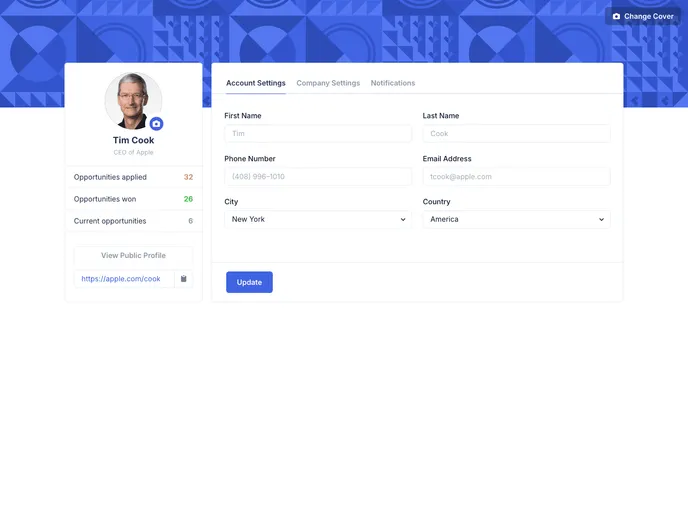
The DemoUser Profile by Mehdi Neysi is a feature-rich theme that enhances user profiles with various customization options. It provides an improved user experience and a visually appealing design.
Features:
- Change profile image: Users can easily update their profile picture.
- Change cover image: Users can also change the cover image of their profile.
- Copy user profile link: Users have the ability to copy a link to their profile for easy sharing.
- Added account settings: The theme includes account settings functionality for users to manage their profile information.
- Added company settings: Users can set up and manage their company information within their profile.
- Added notifications: The theme provides notifications to keep users informed of any important updates or interactions.
- Responsive Design: The theme is built with a responsive design, ensuring optimal viewing and user experience across different devices.
- Custom scrollbar: The theme incorporates a custom scrollbar design, adding a touch of customization to the user profile.
Installation:
To install the DemoUser Profile theme, follow these steps:
- Clone the repository:
git clone [repository-url]
- Install the required dependencies:
npm install
- Start the development server:
npm start
- Access the theme at
http://localhost:3000in your web browser.
Summary:
The DemoUser Profile by Mehdi Neysi offers a range of exciting features to enhance user profiles. With options to change profile and cover images, copy profile links, manage account and company settings, receive notifications, and a responsive design, this theme provides a comprehensive solution for creating captivating user profiles. Additionally, the custom scrollbar adds a unique touch to the overall design.


