


 Github Stars:
 Last Commit:
  Created:
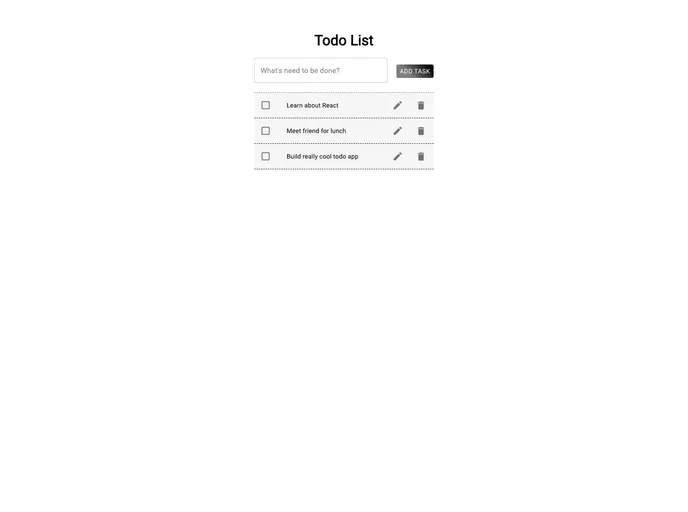
Overview
Creating a Todo application has never been easier, especially when leveraging the powerful combination of React and Material-UI. This framework allows developers to build visually appealing and functional applications with minimal effort. By following a few simple steps, you can set up your Todo app and customize it to your liking, focusing on functionality without getting bogged down by complex setups.
With this guide, you’ll harness the potential of React components seamlessly integrated with Material-UI, creating a user-friendly interface that enhances user experience. From installation to implementation, the process is straightforward and provides an excellent foundation for building on your app’s functionality.
Features
- Easy Setup: Quickly initialize your React app with a single command, allowing for a fast start to your project.
- Customizable Components: Create unlimited custom components by organizing them in a dedicated folder, giving you full control over your app’s structure and design.
- Material-UI Integration: Simplify styling with Material-UI, a library that offers a range of pre-designed components built specifically for React.
- Roboto Font Support: Incorporate the elegant Roboto font easily by installing it, which ensures your app looks polished and professional.
- Icon Support: Enhance functionality with Material-UI icons, providing a visual cue to users and making interactions more intuitive.
- User-Friendly Buttons: Implement attractive buttons like “ADD TASK” that are ready to use, ensuring a consistent design language throughout your app.
- Responsive Design: Benefit from Material-UI’s responsive design capabilities, ensuring your application looks great on any device.
- Community Support: Access a wealth of resources and community support for troubleshooting and expanding your app’s features as needed.


