


 Github Stars:
 Last Commit:
  Created:

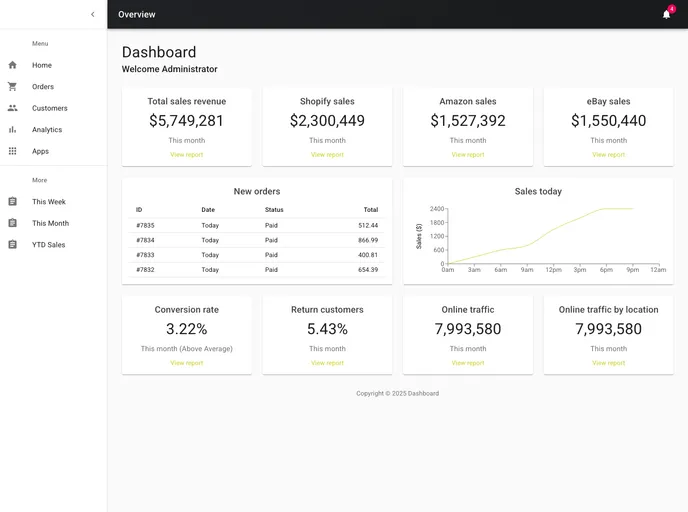
Overview:
The ecommerce dashboard project is created using Create React App, a popular tool for bootstrapping React applications. It provides a curated set of features and configurations that make it easy to develop and deploy the dashboard. The project comes with scripts that allow you to start the app in development mode, run tests, build the app for production, and more. Additionally, it provides documentation for further learning and customization.
Features:
- Easy setup: The project is bootstrapped with Create React App, providing a simple and straightforward setup process.
- Development mode: The
npm startscript allows you to run the app in development mode, making it easy to test and iterate on your code. - Production build: The
npm run buildscript bundles and optimizes the app for production, generating a build folder ready for deployment. - Customization: The
npm run ejectcommand gives you full control over the configuration files and dependencies, allowing for advanced customization if desired. - Documentation: The project comes with extensive documentation, including guides on code splitting, bundle size analysis, creating progressive web apps, advanced configuration, deployment, and troubleshooting.
Installation:
To install and set up the ecommerce dashboard project:
- Make sure you have Node.js installed on your machine.
- Navigate to the project directory using the command line.
- Run the command
npm installto install the project dependencies. - Once the installation is complete, you can start the app in development mode with the command
npm start. - Open your browser and visit http://localhost:3000 to view the app.
- Use the available scripts and documentation to further develop, build, test, and deploy the app as needed.
Summary:
The ecommerce dashboard project is built using Create React App, providing a convenient starting point for developing and deploying a React-based dashboard. It offers essential features like development mode, production build, customization options, and thorough documentation. By following the installation guide and utilizing the provided scripts and documentation, developers can efficiently create and customize their ecommerce dashboard.


