


 Github Stars:
 Last Commit:
  Created:
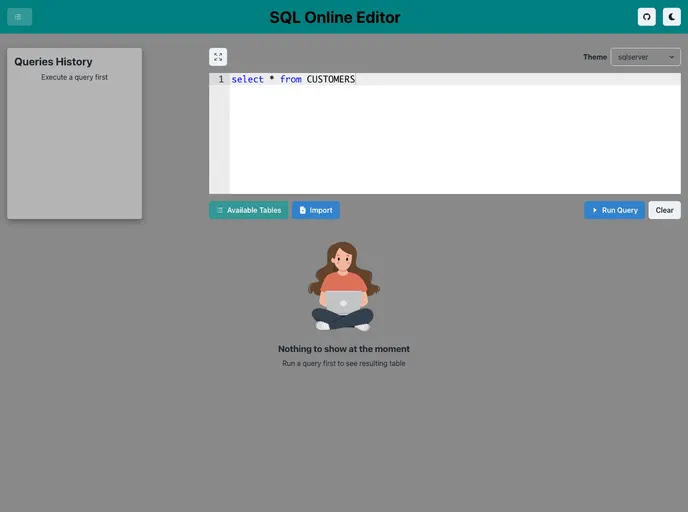
Overview:
SQL Online Editor aims to provide users with a seamless and user-friendly platform for executing SQL queries, displaying query results in a table, maintaining a query history log, and supporting the export of results in CSV formats. The application also includes a list of themes to change the editor UI and a sidebar with a list of available tables for easy reference.
Features:
- SQL Query Execution: Users can input custom SQL queries and execute them against the connected database.
- Result Tabular Display: Query results are presented in a tabular format with smooth scrolling for easy navigation through large datasets.
- Query History: The application maintains a history log of all executed queries, allowing users to revisit previous queries and re-run them as needed.
- Export Data: Users have the option to download query results in CSV format.
- List of Available Tables: The sidebar displays a list of available tables in the connected database.
- Change Editor Theme and Size: Users can change the theme of the Editor by selecting options from a dropdown and expand or shrink the editor size.
Installation:
To install the SQL Online Editor, follow these steps:
- Step 1: Clone the Git repository with the following command:
git clone https://github.com/username/sql-online-editor.git
- Step 2: Change to the project directory:
cd sql-online-editor
- Step 3: Install the required dependencies:
npm install
- Step 4: Start the development server:
npm start
- Step 5: Open the application in your browser at http://localhost:3000.
Summary:
SQL Online Editor is a powerful tool for executing SQL queries in a user-friendly interface. With features like query execution, result tabular display, query history, data export, and table listing, it provides a seamless experience for developers and database administrators. The ability to change the editor theme and size adds customization options to enhance user comfort. Overall, SQL Online Editor is a valuable tool for those working with databases.


