


 Github Stars:
 Last Commit:
  Created:


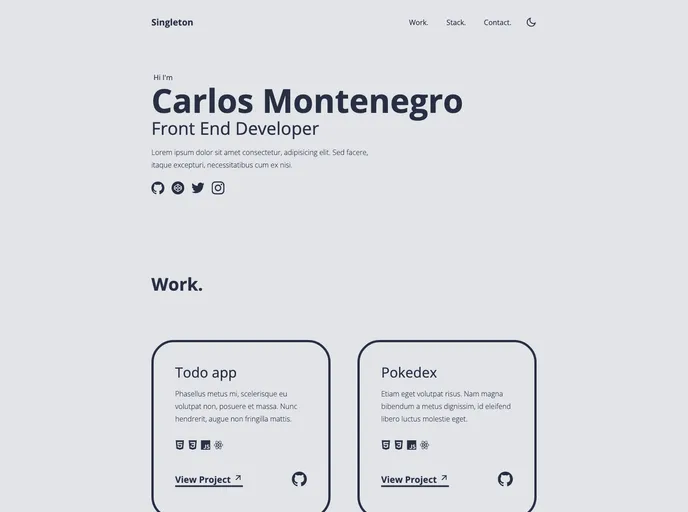
Overview
Singleton is a Minimal Portfolio Template built with React and Vite. It is a user-friendly template that is designed to showcase your portfolio. The template comes with a live preview, making it easy to customize and personalize according to your preferences.
Features
- Minimal Design: Singleton offers a clean and minimal design, allowing the focus to remain on the showcased portfolio items.
- React and Vite: Built with React and Vite, Singleton provides a modern and efficient development environment.
- Easy Customization: The template is easy to customize and personalize, allowing you to showcase your portfolio in a unique and creative way.
Installation
Before installing Singleton, ensure that you have NPM or PNPM installed on your system. You can install NPM using the following command:
npm install
Alternatively, you can install PNPM using the following command:
pnpm install
To set up Singleton, follow these steps:
- Clone the repository to your local machine.
- Install the necessary NPM packages by running
npm installorpnpm install. - Start the development server.
To use Singleton:
- Open the file
index.htmland replace the<title>Singleton</title>tag with<title>Your Name</title>. - Open the file
src/data.jsand make any necessary changes. - Build and deploy Singleton to generate a full static production build.
- Preview the site as it will appear once deployed.
Summary
Singleton is a Minimal Portfolio Template built with React and Vite. It offers a clean and minimal design, making it easy to showcase your portfolio in a unique and creative way. With its easy customization and live preview features, Singleton is a user-friendly template that is suitable for individuals looking to display their work and talents.


