


 Github Stars:
 Last Commit:
  Created:
Overview:
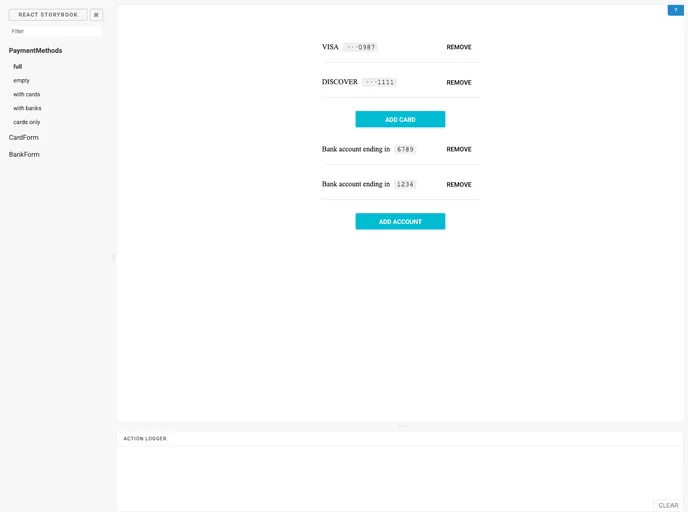
The npm versionReact components for payments provides a set of components for handling payments within a React application. The components include <CardForm>, which allows for credit card entry with validation, <BankForm>, which allows for bank account entry with validation, and <PaymentMethods>, which displays a list of payment methods with the ability to add or remove them. The components can be customized using props and CSS, and further customization can be done through small file modifications.
Features:
- <CardForm>: Credit card entry with validation.
- <BankForm>: Bank account entry with validation.
- <PaymentMethods>: List of payment methods with add and remove functionality.
Installation:
To install the theme, follow these steps:
- Install the npm package:
npm install react-payment
- Import the required components:
import { CardForm, BankForm, PaymentMethods } from 'react-payment';
- Wrap the components in a <MuiThemeProvider> tag to apply the default Material-UI theme:
import React from 'react';
import { MuiThemeProvider } from '@material-ui/core/styles';
import { CardForm, BankForm, PaymentMethods } from 'react-payment';

const App = () => {
  return (
    <MuiThemeProvider>
      <CardForm />
      <BankForm />
      <PaymentMethods />
    </MuiThemeProvider>
  );
}

export default App;
Summary:
The npm versionReact components for payments provide a convenient way to handle payments in a React application. The components include credit card and bank account entry forms, as well as a list of payment methods. They can be easily customized using props and CSS, and further customization can be done through small file modifications.


