


 Github Stars:
 Last Commit:
  Created:


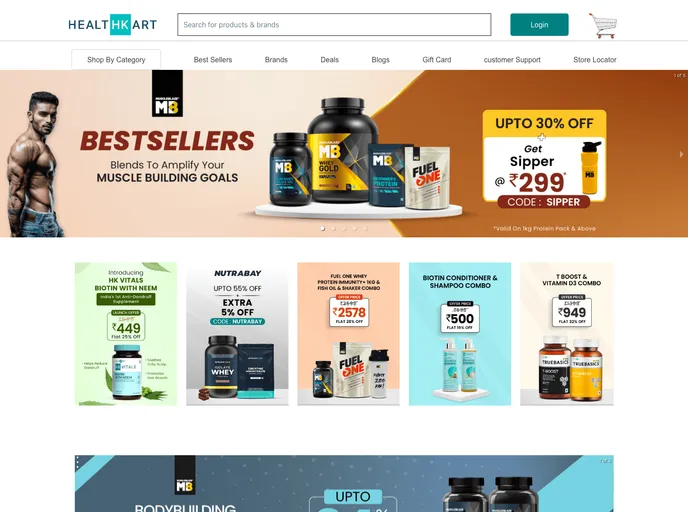
Overview
This product analysis is focused on HealthKart.com, a shopping website clone for purchasing medication, supplements, vitamins, and health accessories. The website aims to provide users with the latest arrivals in these categories. The clone has been deployed on a platform called Netlify, and the team that developed it consists of four members: Rahul Deb, Rohit Rajput, Ranjan Kumar, and Sai Kiran. The tech stack used includes React JS, Chakra UI, JavaScript, CSS, and Axios.
Features
- Wide Range of Products: HealthKart.com clone offers a diverse selection of medication, supplements, vitamins, and health accessories to cater to various health needs.
- Latest Arrivals: Users can stay updated on new product arrivals in the medicine and health accessory categories, ensuring access to the latest advancements in healthcare.
- User Registration and Login: The website allows users to create accounts, log in, and securely handle their personal information and purchase history.
- Admin Panel: The clone includes an admin panel with features like adding new products and managing the product listing.
Installation
To install and run the HealthKart.com clone, follow these steps:
- Ensure you have Node.js installed on your system.
- Clone the project repository from the following link: [repository-link].
- Open a terminal and navigate to the cloned project directory.
- Install the project dependencies by running the following command:
npm install - Once the dependencies are installed, start the application using the following command:
npm start - The application will now be running on your local machine. Access it by opening a web browser and navigating to
http://localhost:3000.
Summary
The HealthKart.com clone is a shopping website aiming to provide users with a wide range of medication, supplements, vitamins, and health accessories. It features a user-friendly interface, user registration and login functionality, the ability to browse and purchase products, and an admin panel for managing the product inventory. The technology stack used in the development includes React JS, Chakra UI, JavaScript, CSS, and Axios. Users can explore the latest arrivals in the healthcare industry and make convenient purchases through this clone website.


