


 Github Stars:
 Last Commit:
  Created: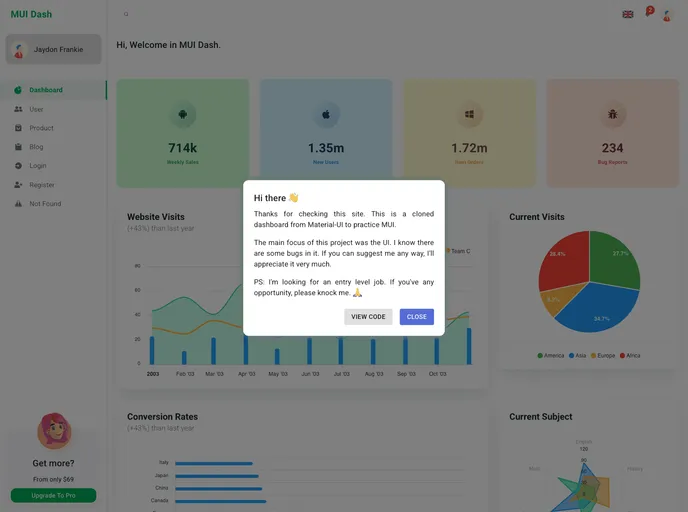
Overview:
The MUI Dash is a Material UI dashboard built with Reactjs, offering a range of common components for practice and learning. The project covers various pages like Dashboard, User, Product, Blog, Login, Register, and 404, styled using the @material-ui/styles library. While there are some challenges with routing, particularly nesting components within the AuthLayout, the project provides insights into React development using Material UI.
Features:
- Pages: Includes Dashboard, User, Product, Blog, Login, Register, and 404.
- Styling: Utilizes the styled function from @material-ui/styles and the sx property in certain components.
- React Compatibility: Built with Reactjs, making it suitable for learning and practicing React skills.
- Create React App: Bootstrapped with Create React App for easy setup and development.
- Routing with React-Router-Dom: Uses “react-router-dom” for routing, providing insights into navigation within the application.
Installation:
To install the MUI Dash dashboard theme, you can follow these steps:
- Clone the repository to your local machine:
git clone <repository-url> - Navigate to the project directory:
cd project-directory - Install the dependencies using npm:
npm install - Start the development server:
npm start - Open http://localhost:3000 in your browser to view the dashboard.
Summary:
The MUI Dash dashboard project offers a practical environment to enhance skills in Reactjs with Material UI components. Despite some challenges with routing, the project provides valuable insights into building a responsive dashboard with common components. The use of styled functions, @material-ui/styles, and react-router-dom adds to the learning experience for beginners in web development.


